Credit Subscription - Agency Account
In short
The credit subscription works like this: You buy a credit balance. One credit corresponds to one domain (client) for one month. In the Agency Dashboard, you can flexibly activate or deactivate clients to make the best possible use of your credits.
The billing information is only available if you use the credit subscription.
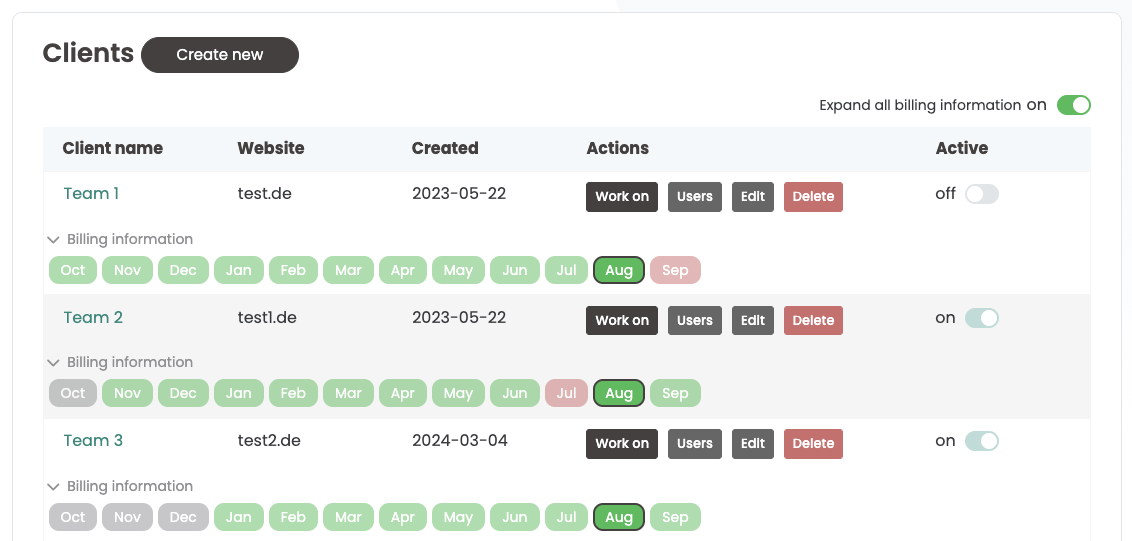
Agency dashboard with billing information
You can add new clients in the Agency Account via Create new. Each client has its own billing information that shows the status per month:
- 🟢 Green: active and calculated with one credit
- 🔴 Red: inactive and not calculated this month
- ⚪️ Gray: not yet created this month
Activate/deactivate client
To deactivate a client, switch the slider on the right from On to Off. The client will remain active until the end of the month and will no longer be charged with a credit from the next month. In the billing information you will see the coming month, in which it will then appear highlighted in red.
If you want to reactivate a client, set the slider back to On. The client is activated immediately and charged directly with a credit.
What happens to the active experiment when the client is inactive?
Ongoing experiments or 100% playouts are continued even when clients are inactive. However, access to the client dashboard is deactivated. To regain access, reactivate the client.