Varify Realtime Tracking
Les comptes créés à partir du 17 septembre 2026 peuvent activer « Varify Realtime Tracking » directement sous « Tracking Setup ». Les clients existants peuvent demander cette fonctionnalité en contactant [email protected].
En bref
Active Varify Realtime Tracking et analyse tes expériences directement dans Varify sans délai. Un service de tracking Varify dédié mesure tes objectifs définis et les affiche dans Varify Reporting.
Comment utiliser Varify Realtime Tracking
Étape 1 : configure ton système de tracking
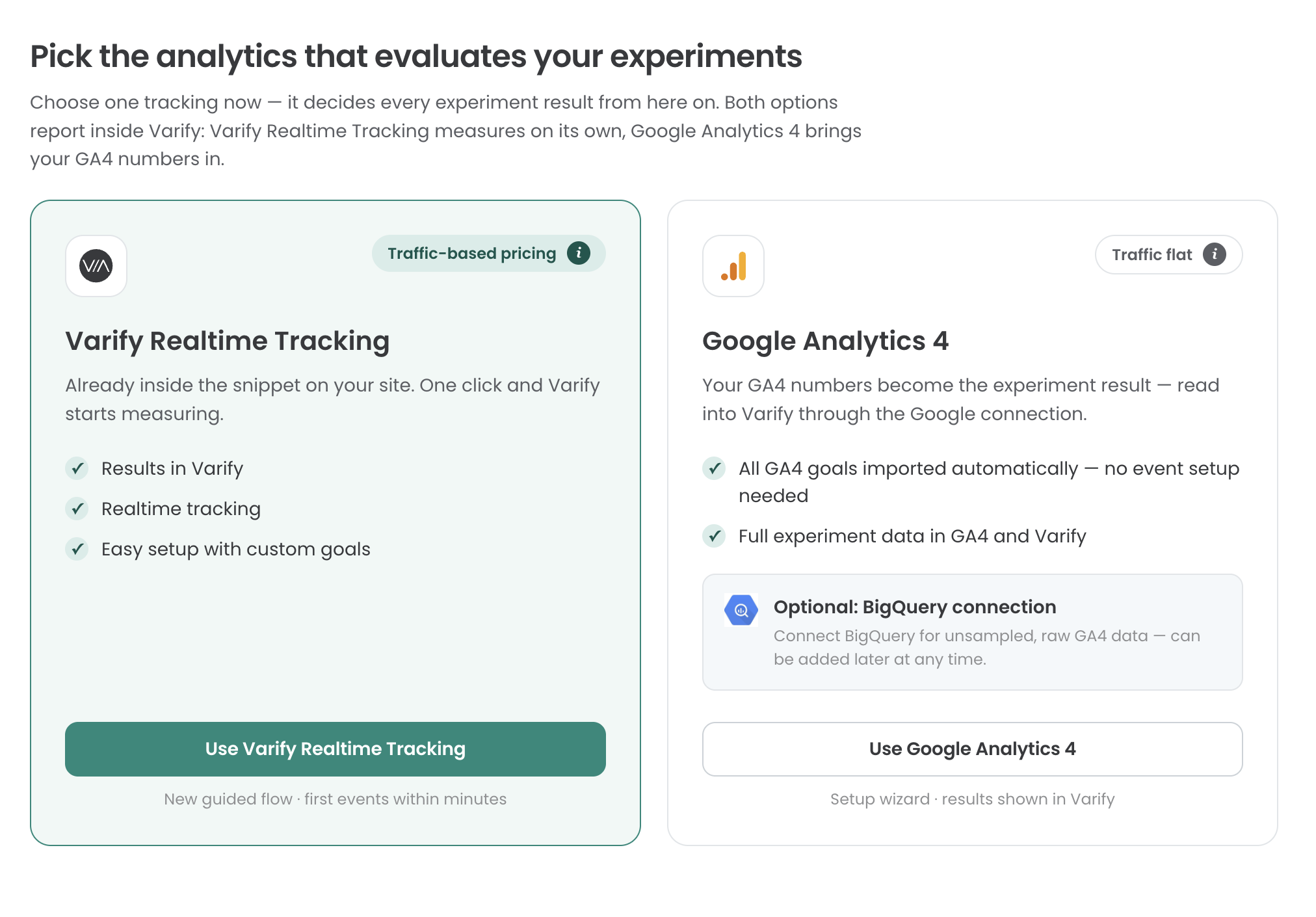
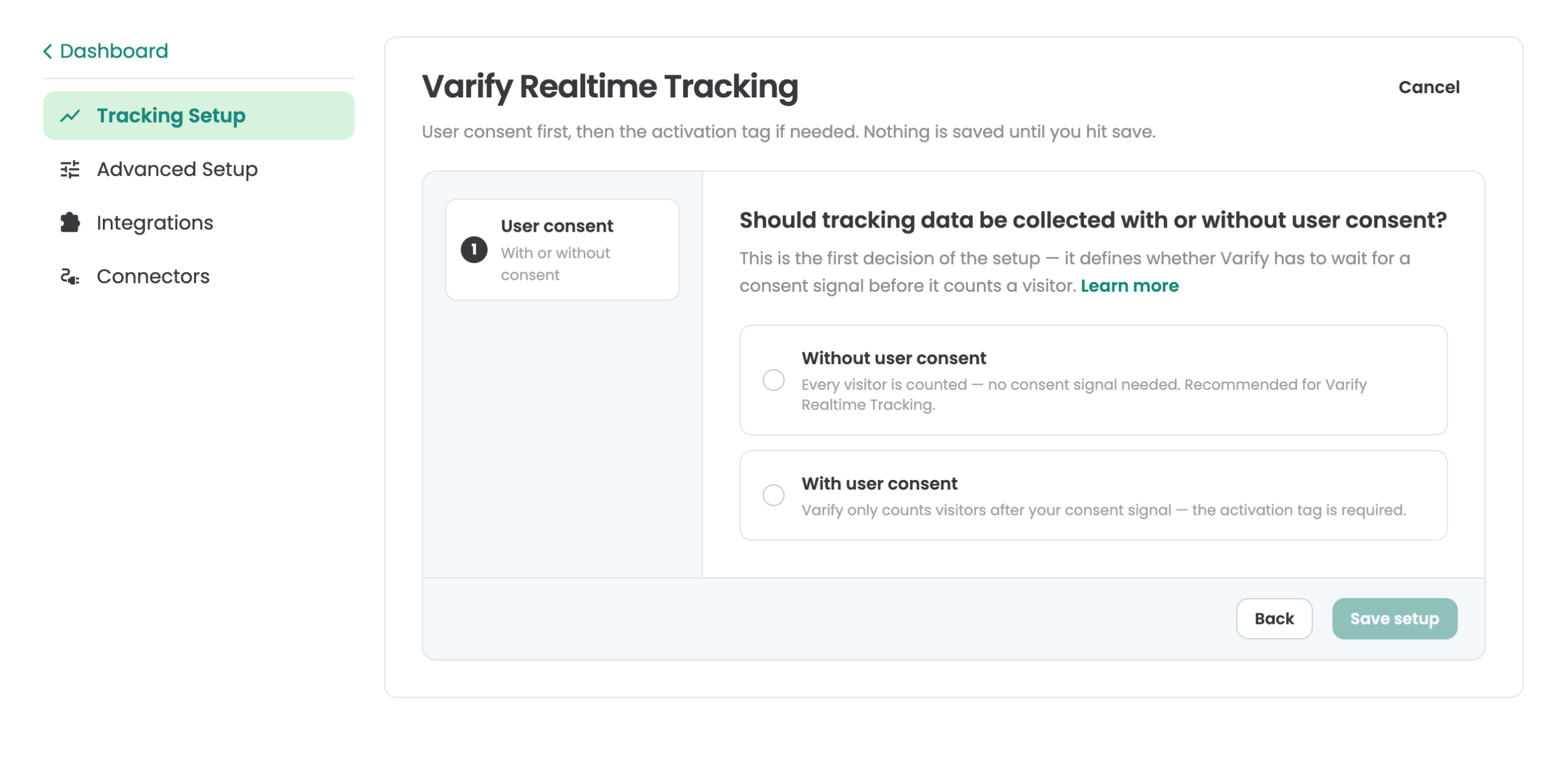
Va dans « Tracking Setup » et sélectionne « Varify Realtime Tracking ». Tu peux ensuite décider d'intégrer Varify Realtime Tracking avec ou sans « User Consent ». Cette page peut t'aider à prendre cette décision : https://varify.io/varify-tracking-gdpr-compliance/
Étape 2 : Activation de Varify Realtime Tracking
Intégration sans consentement de l'utilisateur
Si tu as décidé de charger Varify Realtime Tracking sans consentement de l'utilisateur, ta configuration de tracking de base est déjà en place et tu peux passer à l'étape 3.
Intégration avec consentement de l'utilisateur
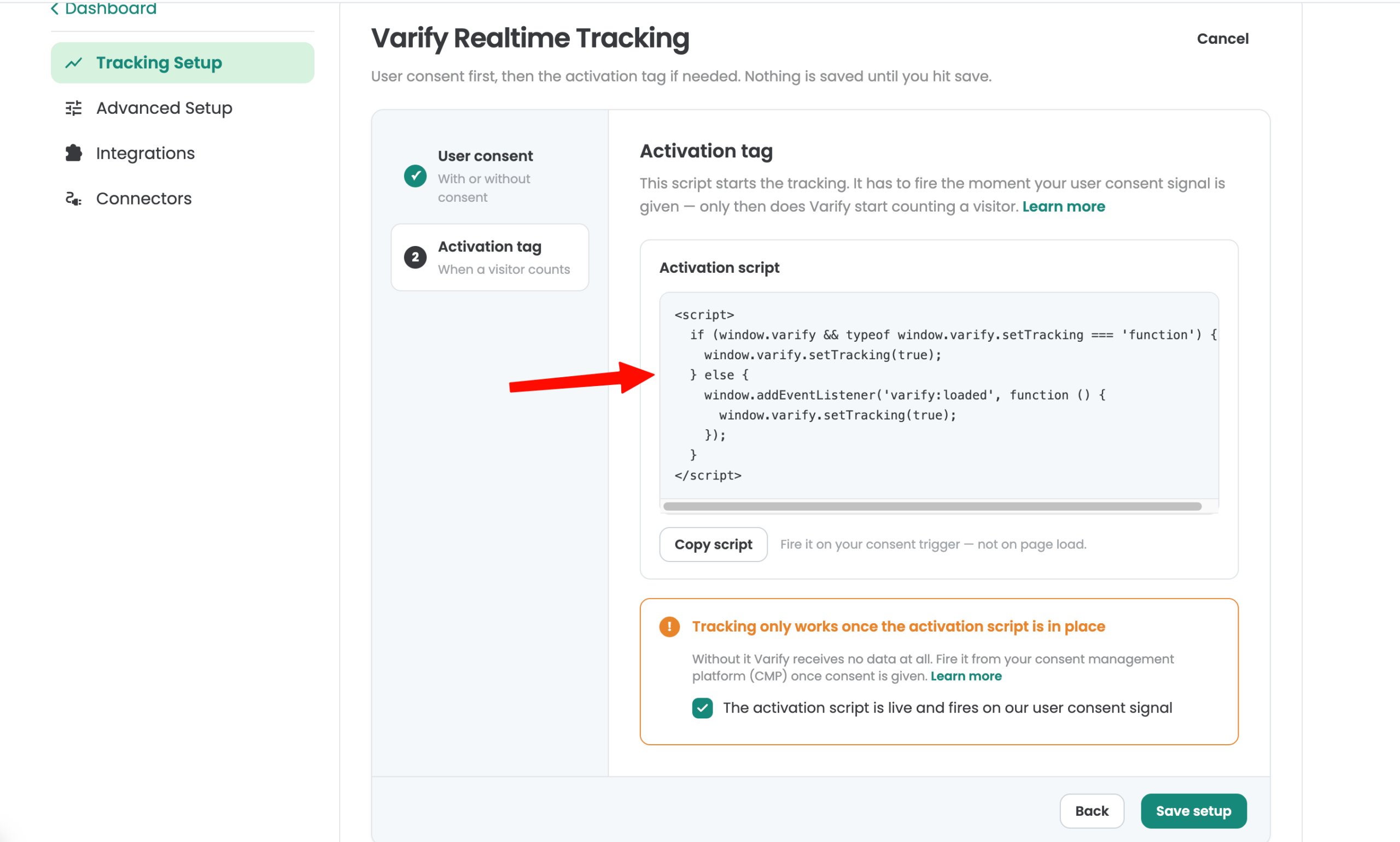
Un script d'activation est fourni pour l'intégration avec le consentement utilisateur. Le tracking est activé dès que ce script est chargé. Intègre le script conformément aux spécifications de ta plateforme de gestion du consentement (CMP). Tu peux également utiliser Google Tag Manager (GTM) pour une intégration basée sur les pages vues et un signal de consentement valide.
Étape 3 : Configuration de tes objectifs Varify
Pour analyser tes expériences, crée des objectifs. Tu trouveras la section « Goals » dans la barre latérale à gauche.
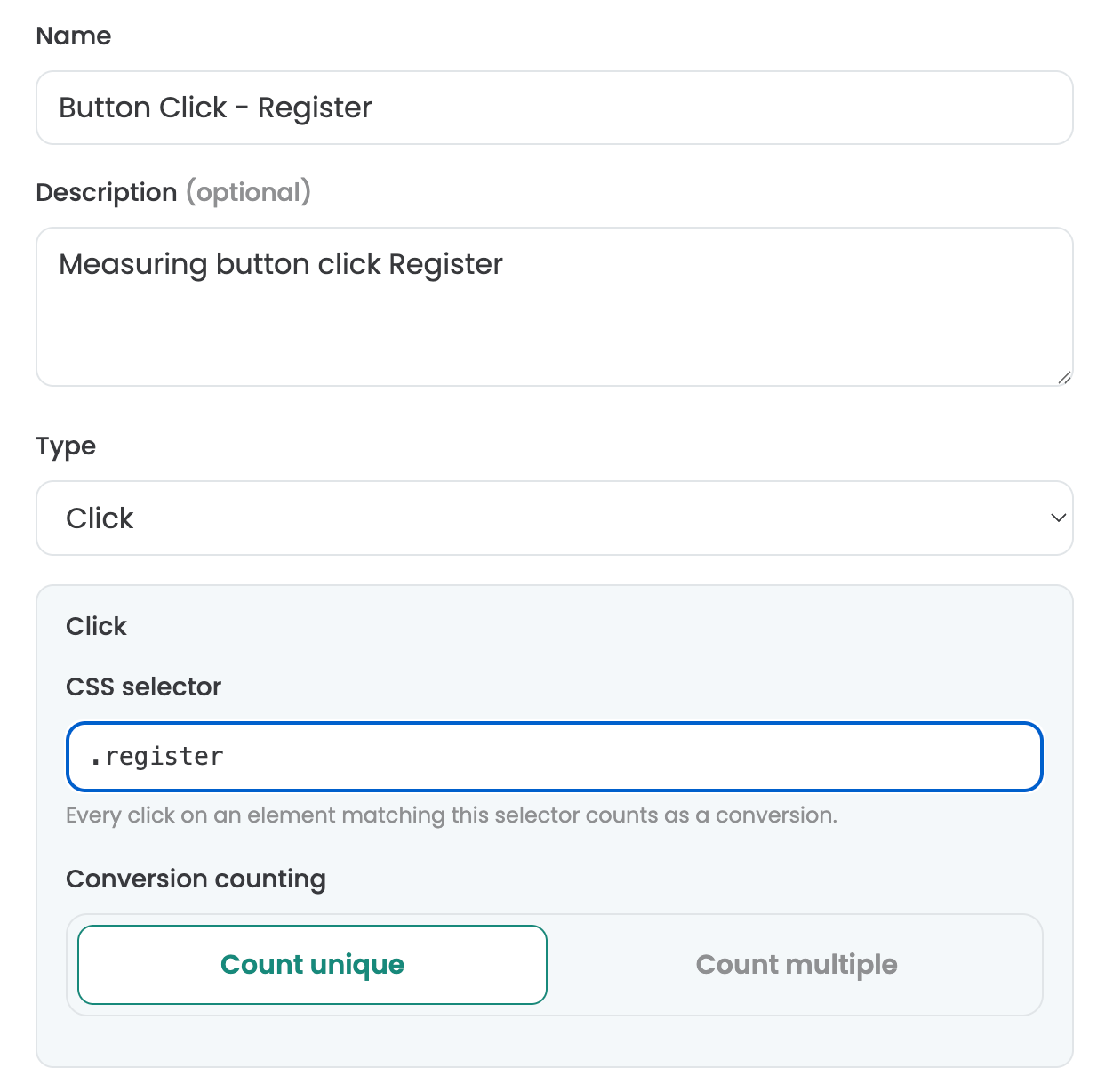
Dans la section « Goals », tu peux choisir parmi trois types d'objectifs : Click Goal, Page View Goal et Custom Goal.
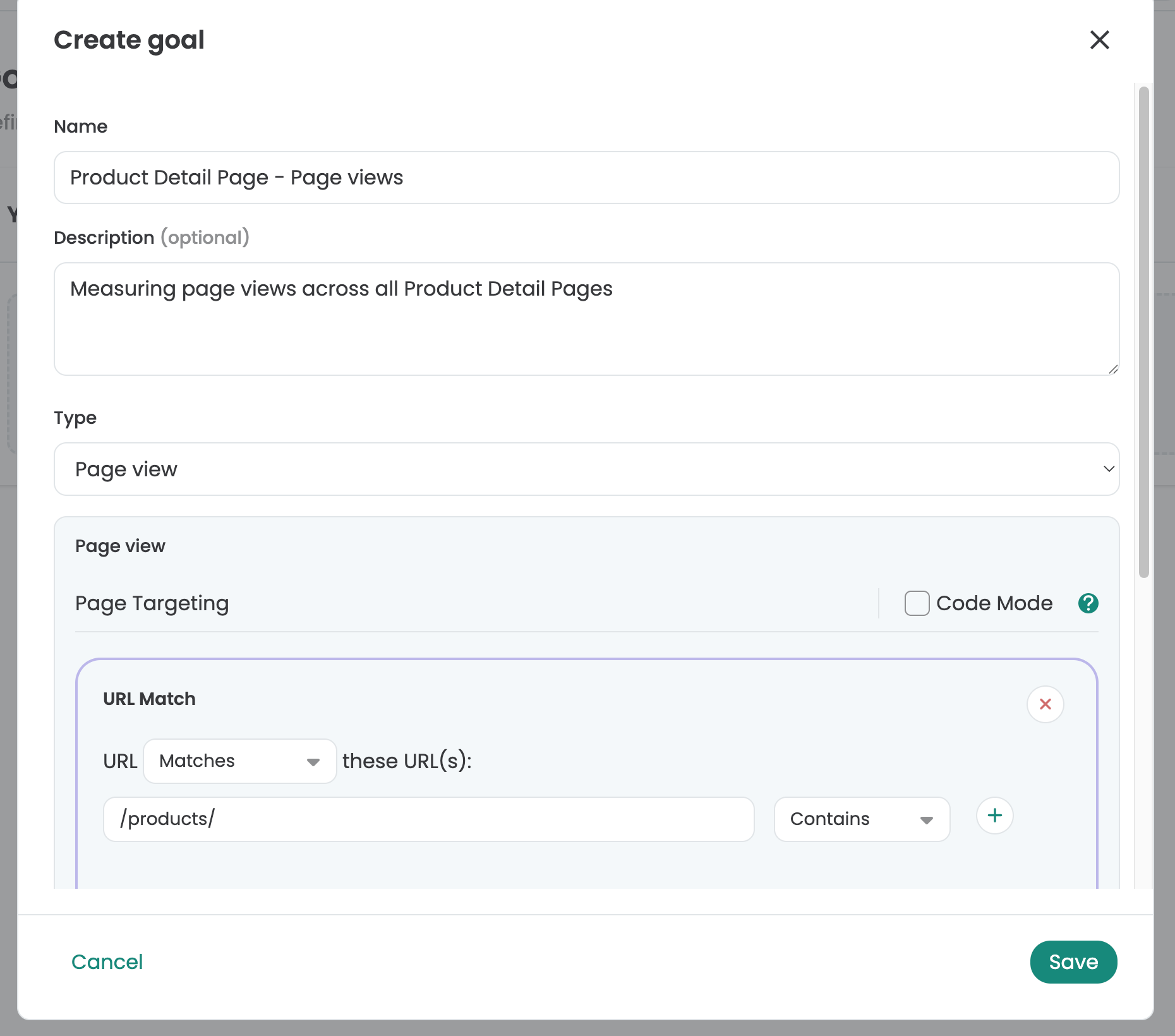
Configuration des objectifs de clic
Avec Click Goals, tu peux mesurer la fréquence à laquelle les participants à l'expérience cliquent sur des éléments. Pour ce faire, définis un sélecteur personnalisé pour l'élément. Pour identifier un sélecteur personnalisé pour un élément, tu peux par exemple utiliser l'éditeur visuel de Varify. Ouvre-le et sélectionne l'élément que tu souhaites suivre. Copie ensuite le sélecteur et saisis-le dans le champ « Selector » sous « Click Goal ».
Configuration des objectifs de vue de page
Avec les objectifs de vue de page, tu peux mesurer la fréquence à laquelle les participants à ton expérience consultent des pages ou des types de pages spécifiques. Pour cela, tu peux simplement définir tes propres règles personnalisées pour suivre les vues de pages qui répondent à tes critères.
Configuration des objectifs personnalisés
Tu peux utiliser Custom Goals pour créer des objectifs personnalisés. Cela peut être utile, par exemple, lorsque tu souhaites mesurer la valeur du chiffre d'affaires d'une commande. Les Custom Goals sont déclenchés via JavaScript dans ton expérience.
Comptage des conversions
Ce paramètre te permet de spécifier si un objectif doit être suivi une seule fois ou plusieurs fois. Par défaut, dans les tests A/B, chaque objectif n'est suivi qu'une seule fois, car en général tu souhaites seulement savoir si un utilisateur a atteint l'objectif ou non. Le suivi multiple peut toutefois être utile pour les objectifs de chiffre d'affaires : dans ce cas, la valeur de commande d'un utilisateur peut être cumulée sur plusieurs sessions.
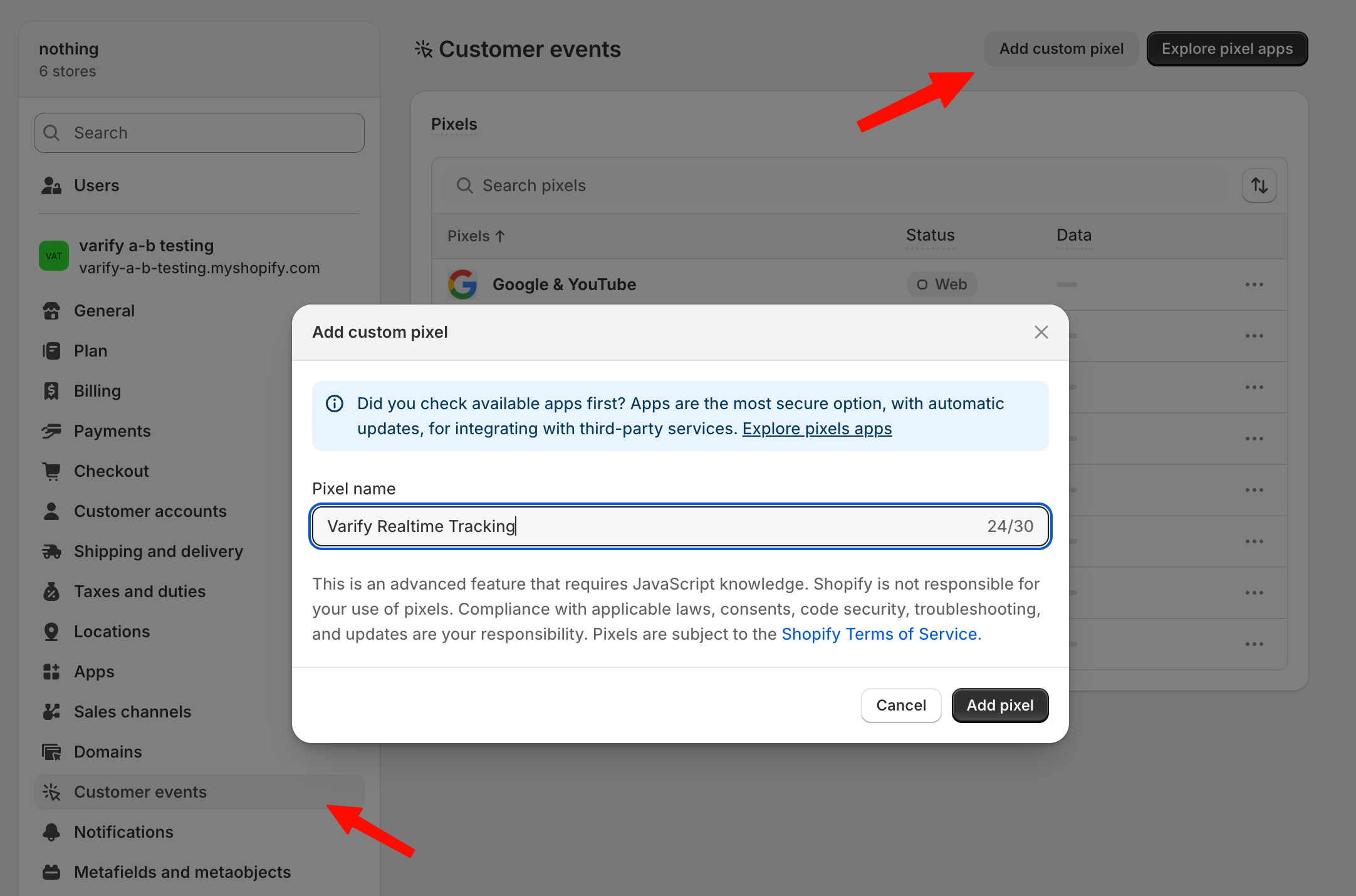
Suivi des objectifs de checkout Shopify
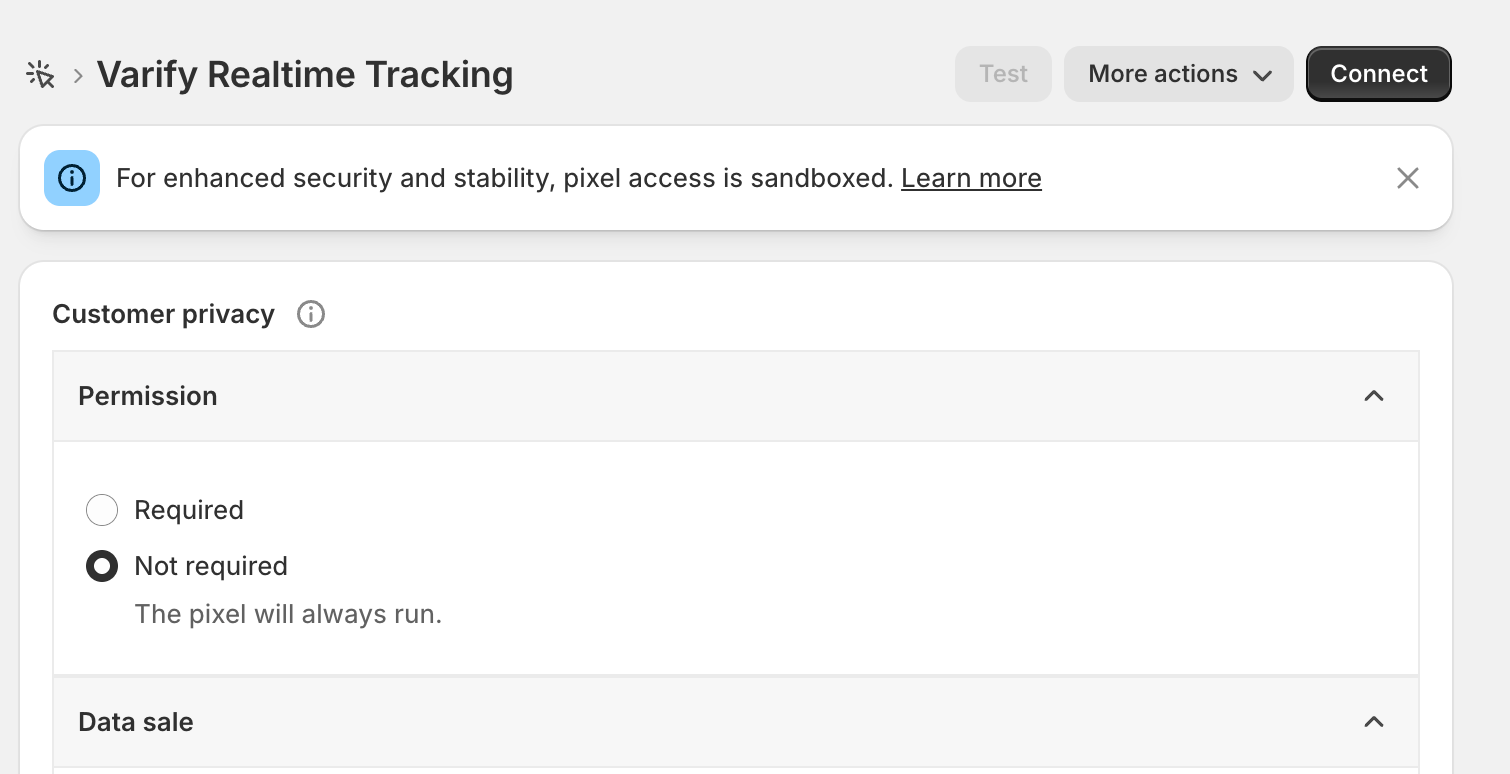
Les objectifs d'événements Shopify tels que « Purchase » ou « Start Checkout » ne peuvent pas être suivis directement via ton site web. À partir de 2025, Shopify a rendu obligatoire le fait que ceux-ci ne peuvent être suivis que via le pixel personnalisé sur ton site web. Pour suivre ces objectifs, va dans « Settings > Customer Events » et clique sur le bouton « Add Custom Pixel ». Définis le nom du pixel sur « Varify Realtime Tracking » et clique sur « Add Pixel ».
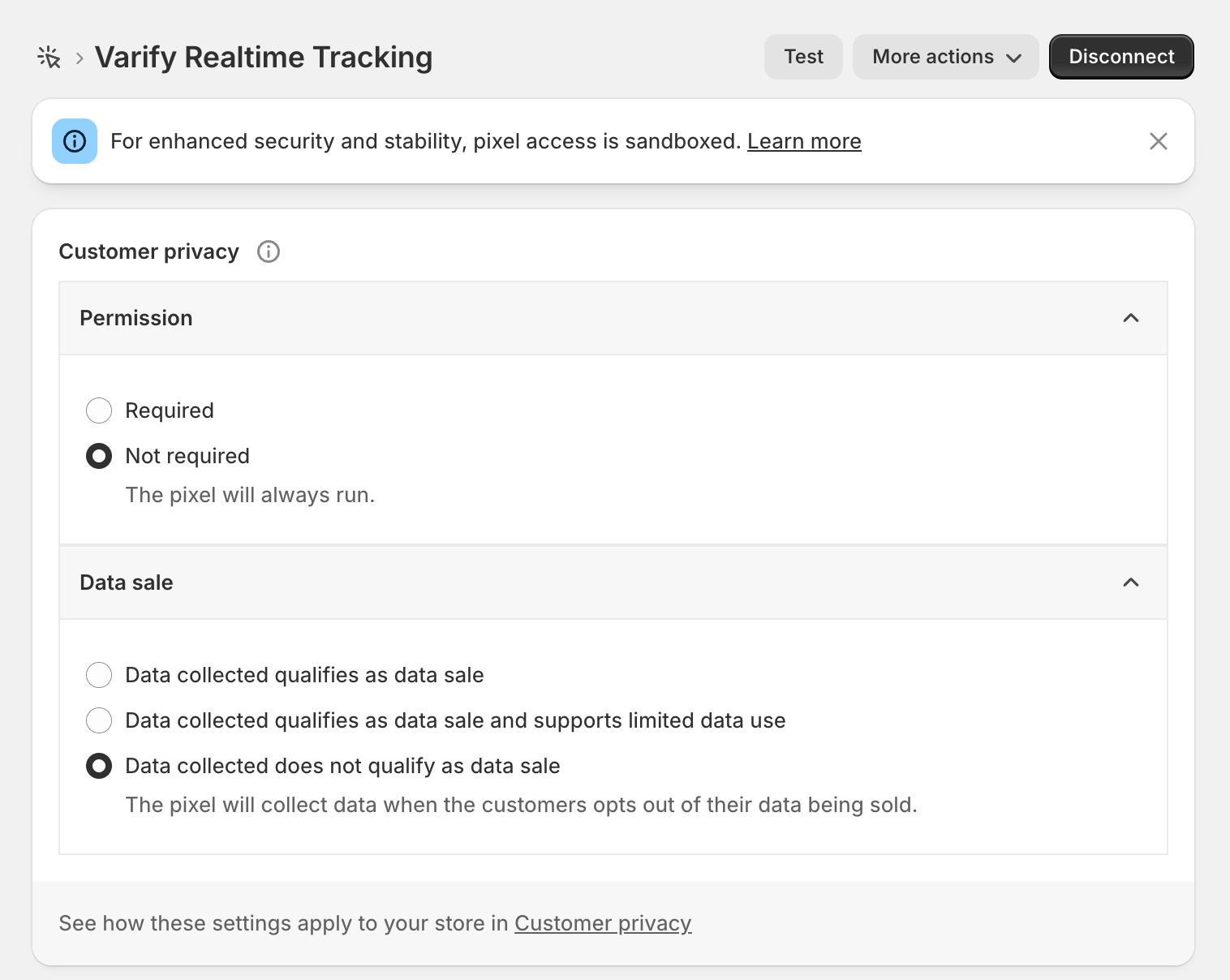
Après avoir créé le pixel, ouvre d'abord la section « Customer Privacy » et règle « Data Sale » sur « Data collected does not qualify as a data sale. » Varify ne vend pas de données et ne suit que des valeurs agrégées pour tes analyses d'expériences.
Pour « Permission », tu dois sélectionner « Not required » si tu souhaites effectuer le tracking sans consentement utilisateur, comme indiqué précédemment dans la configuration du tracking. Si en revanche tu effectues le tracking avec le consentement utilisateur, tu peux laisser le réglage sur « Required ».
Ensuite, copie le code mis en évidence sous ce paragraphe et colle-le sous « Code ».
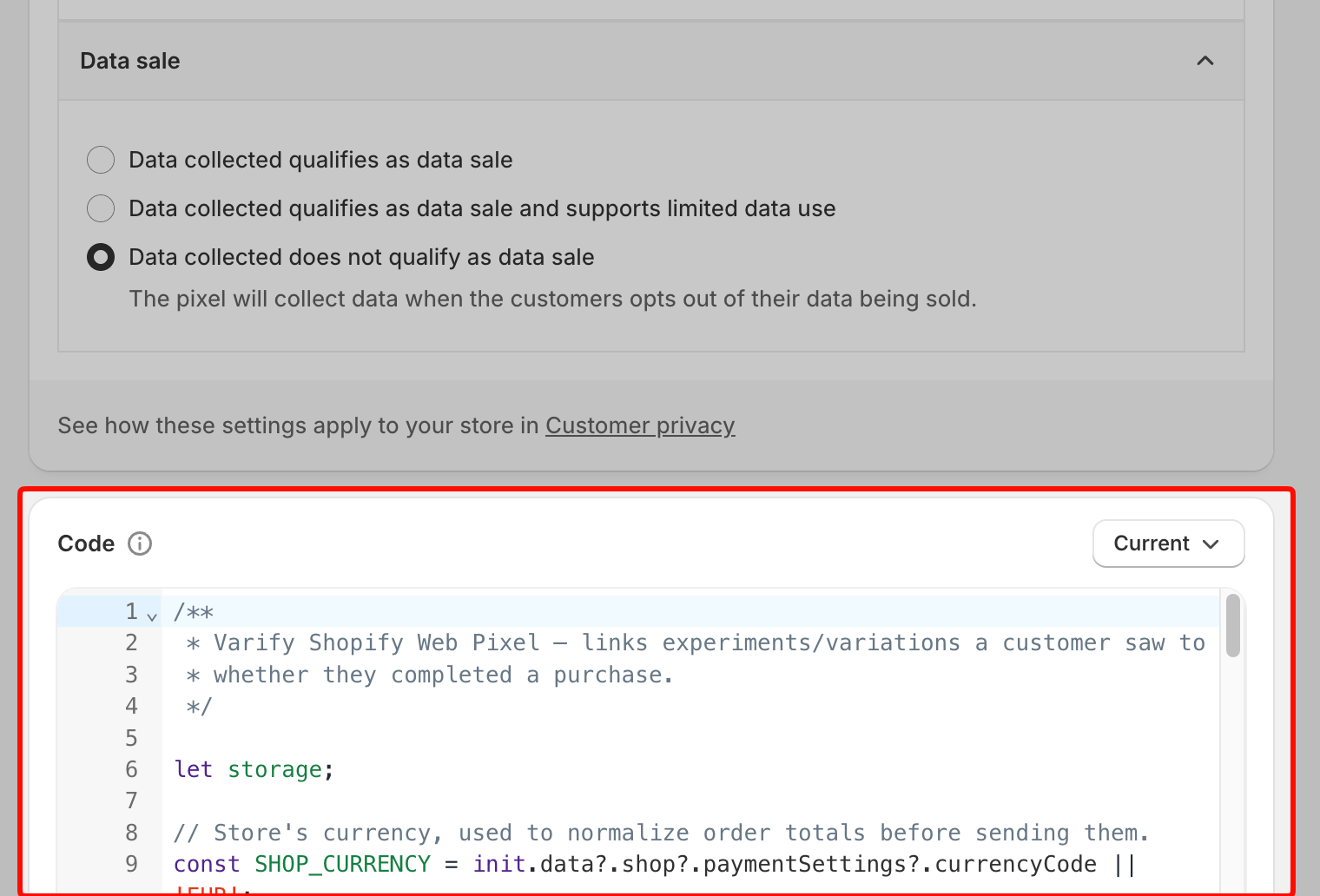
/**
 * Varify Shopify Web Pixel — links experiments/variations a customer saw to
 * whether they completed a purchase.
 */

let storage;

// Store's currency, used to normalize order totals before sending them.
const SHOP_CURRENCY = init.data?.shop?.paymentSettings?.currencyCode || 'EUR';

// Free FX API, used only when an order's currency differs from the store's.
const FX_API = 'https://api.frankfurter.dev/v1/latest';
const FX_TTL_MS = 6 * 60 * 60 * 1000;
const FX_TIMEOUT_MS = 2000;

const VARIFY_INGESTION_ENDPOINT = 'https://w.varify.io/events';

// One id per pixel session, reused for every event this pixel sends.
const pixelSessionId = crypto.randomUUID();

// Reads this pixel's saved data (experiments seen, anonymous id, etc.),
// cached in-memory after the first read.
async function getVarifyData() {
  if (storage) {
    return storage;
  }
  storage = (async () => {
    try {
      const raw = await browser.localStorage.getItem('varify-data');
      return raw ? JSON.parse(raw) : {};
    } catch (error) {
      // Don't cache a broken read — retry from scratch next time.
      storage = undefined;
      console.error('Varify: error reading local storage', error);
      return {};
    }
  })();
  return storage;
}

// Units of `currency` per 1 unit of the store's currency, or null if
// unavailable — callers should skip sending rather than guess a rate.
async function getFxRate(currency) {
  const cacheKey = `varify-fx-${SHOP_CURRENCY}-${currency}`;

  try {
    const cached = await browser.localStorage.getItem(cacheKey);
    if (cached) {
      const { rate, ts } = JSON.parse(cached);
      if (rate && ts && Date.now() - ts < FX_TTL_MS) {
        return rate;
      }
    }
  } catch (error) {
    // Fall through and fetch fresh below.
  }

  try {
    const url = `${FX_API}?from=${encodeURIComponent(SHOP_CURRENCY)}&to=${encodeURIComponent(currency)}`;

    let res;
    if (typeof AbortController === 'function') {
      const controller = new AbortController();
      const timer = setTimeout(() => controller.abort(), FX_TIMEOUT_MS);
      try {
        res = await fetch(url, { signal: controller.signal });
      } finally {
        clearTimeout(timer);
      }
    } else {
      res = await fetch(url);
    }

    if (!res.ok) {
      console.warn(`Varify: FX API returned ${res.status} for ${currency}.`);
      return null;
    }

    const json = await res.json();
    const rate = json?.rates?.[currency];

    if (typeof rate !== 'number' || !isFinite(rate) || rate <= 0) {
      console.warn(`Varify: FX API gave no usable rate for ${currency}.`, json);
      return null;
    }

    await browser.localStorage.setItem(
      cacheKey,
      JSON.stringify({ rate, ts: Date.now() }),
    );
    return rate;
  } catch (error) {
    console.warn(`Varify: FX lookup failed for ${currency}.`, error);
    return null;
  }
}

// Varify's endpoint only accepts flat text/number values, so a list of
// experiments becomes two comma-separated strings (ids and variation ids).
function flattenExperiments(entries) {
  return {
    experiment_ids: entries.map((entry) => entry.experimentId).join(','),
    variation_ids: entries
      .map((entry) =>
        entry.variationId === null ? 'original' : entry.variationId,
      )
      .join(','),
  };
}

// Edge's identifier also contains "Chrome/", so it must be checked first.
function detectBrowser(userAgent) {
  if (userAgent.includes('Firefox/')) return 'Firefox';
  if (userAgent.includes('Edg/')) return 'Edge';
  if (userAgent.includes('Chrome/')) return 'Chrome';
  if (userAgent.includes('Safari/')) return 'Safari';
  return 'Unknown';
}

function detectDevice(userAgent) {
  if (/Tablet|iPad/i.test(userAgent)) return 'tablet';
  if (/Mobi|Android/i.test(userAgent)) return 'mobile';
  return 'desktop';
}

function detectOs(userAgent) {
  if (/iPhone|iPad|iPod/i.test(userAgent)) return 'iOS';
  if (userAgent.includes('Android')) return 'Android';
  if (userAgent.includes('Win')) return 'Windows';
  if (userAgent.includes('Mac')) return 'macOS';
  if (userAgent.includes('Linux')) return 'Linux';
  return 'Unknown';
}

// Browser timezone, e.g. "Europe/Berlin" — not GPS or IP-based location.
function detectLocation() {
  try {
    return Intl.DateTimeFormat().resolvedOptions().timeZone || undefined;
  } catch {
    return undefined;
  }
}

// Non-identifying browser/page details, added to every event. The pixel
// sandbox may not expose all of these — each lookup is best-effort and
// simply omitted if unavailable.
function collectBrowserInfo() {
  const info = {};

  try {
    const userAgent =
      typeof navigator !== 'undefined' ? navigator.userAgent : undefined;
    if (typeof userAgent === 'string') {
      info.userAgent = userAgent;
      info.browser = detectBrowser(userAgent);
      info.device = detectDevice(userAgent);
      info.os = detectOs(userAgent);
    }
  } catch (error) {
    // Not available in this environment.
  }

  try {
    if (typeof window !== 'undefined' && window.location) {
      info.path = window.location.pathname;
      info.domain = window.location.hostname;
    }
  } catch (error) {
    // Not available in this environment.
  }

  const location = detectLocation();
  if (location) {
    info.location = location;
  }

  return info;
}

// Sends one event to Varify. Never throws — failures are logged and
// swallowed so the pixel/checkout is never affected. Falls back to reading
// the anonymous id from local storage if one wasn't passed in, and returns
// whichever id was actually used so the caller can persist it.
async function sendVarifyEvent(name, teamSqid, anonymousId, properties) {
  const anonymousIdWithFallback =
    anonymousId || localStorage.getItem('varify_anonymous_id');

  if (!teamSqid || !anonymousIdWithFallback) {
    console.warn(
      `Varify: skipping "${name}" event — missing teamSqid or anonymousId.`,
      'Team Sqid',
      teamSqid,
      'Anonymous ID',
      anonymousIdWithFallback,
    );
    return anonymousIdWithFallback;
  }

  try {
    await fetch(VARIFY_INGESTION_ENDPOINT, {
      method: 'POST',
      keepalive: true,
      headers: {
        'Content-Type': 'application/json',
      },
      body: JSON.stringify({
        events: [
          {
            id: crypto.randomUUID(),
            name,
            teamId: String(teamSqid),
            anonymousId: anonymousIdWithFallback,
            sessionId: pixelSessionId,
            properties: { ...collectBrowserInfo(), ...properties },
          },
        ],
      }),
    });
  } catch (error) {
    console.error(`Varify: error sending "${name}" event`, error);
  }

  return anonymousIdWithFallback;
}

// Fired by Varify's tracking script when a customer is shown an experiment.
// Remembers it locally so it can be attached to a later checkout event.
analytics.subscribe('varify', async (event) => {
  const {
    varify_experimentId,
    varify_variationId,
    varify_anonymousId,
    teamId,
    teamSqid,
    storageType = 'localStorage',
  } = event.customData || {};

  if (!varify_experimentId || !teamId || !teamSqid) {
    console.warn('Varify: event missing experimentId or teamId. Event:', event);
    return;
  }

  const validVariationId =
    varify_variationId !== undefined ? varify_variationId : null;

  const existingData = await getVarifyData();

  if (!existingData.data) {
    existingData.data = [];
  }

  const experimentEntry = {
    experimentId: varify_experimentId,
    variationId: validVariationId,
    timestamp: Date.now(),
  };

  existingData.data = existingData.data.filter(
    (entry) => entry.experimentId !== varify_experimentId,
  );

  existingData.data.push(experimentEntry);
  existingData.teamId = teamId;
  existingData.teamSqid = teamSqid;
  existingData.storageType = storageType;

  // Only present once Varify's tracking script has finished loading —
  // don't overwrite a previously-saved id with nothing.
  if (varify_anonymousId) {
    existingData.anonymousId = varify_anonymousId;
  }

  await browser.localStorage.setItem(
    'varify-data',
    JSON.stringify(existingData),
  );
});

// How long an experiment exposure counts toward a later purchase.
const WINDOW_MS = 28 * 24 * 60 * 60 * 1000;

const pruneEntries = (entries) => {
  const threshold = Date.now() - WINDOW_MS;
  return (entries || []).filter(
    (entry) =>
      entry.timestamp && entry.experimentId && entry.timestamp >= threshold,
  );
};

analytics.subscribe('checkout_started', async (event) => {
  const existingData = await getVarifyData();
  if (!existingData.data || existingData.data.length === 0) {
    return;
  }

  existingData.data = pruneEntries(existingData.data);

  await browser.localStorage.setItem(
    'varify-data',
    JSON.stringify(existingData),
  );

  if (existingData.data.length > 0) {
    const resolvedAnonymousId = await sendVarifyEvent(
      'checkout_started',
      existingData.teamSqid,
      existingData.anonymousId,
      flattenExperiments(existingData.data),
    );

    // Persist the fallback id, if used, so it doesn't need re-deriving.
    if (
      resolvedAnonymousId &&
      resolvedAnonymousId !== existingData.anonymousId
    ) {
      existingData.anonymousId = resolvedAnonymousId;
      await browser.localStorage.setItem(
        'varify-data',
        JSON.stringify(existingData),
      );
    }
  }

  // Warm the rate while the customer is still typing.
  const currency = event.data?.checkout?.currencyCode;
  if (currency && currency !== SHOP_CURRENCY) {
    getFxRate(currency);
  }
});

analytics.subscribe('checkout_completed', async (event) => {
  const orderId = event.data?.checkout?.order?.id;
  const money = event.data?.checkout?.subtotalPrice;
  let orderRevenue = money?.amount;
  const orderCurrency = money?.currencyCode;

  // 0 is a valid revenue (100% discount) and must not count as missing.
  if (!orderId || orderRevenue == null || !orderCurrency) {
    console.warn(
      'Varify: checkout_completed missing orderId, revenue or currency.',
    );
    return;
  }

  // subtotalPrice is presentment currency and the event carries no rate or
  // shop-money amount. Convert to shop currency here, or skip.
  if (orderCurrency !== SHOP_CURRENCY) {
    const rate = await getFxRate(orderCurrency);
    if (!rate) {
      console.warn(
        `Varify: skipping order ${orderId} — ${orderRevenue} ${orderCurrency}, no FX rate available.`,
      );
      return;
    }
    const converted = +(orderRevenue / rate).toFixed(2);
    console.info(
      `Varify: converted order ${orderId} — ${orderRevenue} ${orderCurrency} @ ${rate} -> ${converted} ${SHOP_CURRENCY}.`,
    );
    orderRevenue = converted;
  }

  const parsedData = await getVarifyData();
  if (!parsedData.data || parsedData.data.length === 0 || !parsedData.teamId) {
    console.warn('Varify: no valid data in local storage.');
    return;
  }

  // The order-status page refires checkout_completed on every visit.
  if (!Array.isArray(parsedData.sentOrders)) {
    parsedData.sentOrders = [];
  }
  if (parsedData.sentOrders.includes(orderId)) {
    return;
  }

  parsedData.data = pruneEntries(parsedData.data);
  if (parsedData.data.length === 0) {
    return;
  }

  const lineItems = event.data?.checkout?.lineItems;
  let cartProducts = [];

  if (lineItems && Array.isArray(lineItems)) {
    cartProducts = lineItems
      .map((item) => {
        const productId = item.variant?.product?.id?.split('/').pop();
        const variantId = item.variant?.id?.split('/').pop();

        if (productId && variantId) {
          return {
            productId,
            variantId,
          };
        }
        return null;
      })
      .filter((p) => p !== null);
  }

  const resolvedAnonymousId = await sendVarifyEvent(
    'checkout_completed',
    parsedData.teamSqid,
    parsedData.anonymousId,
    {
      ...flattenExperiments(parsedData.data),
      order_id: String(orderId),
      value: orderRevenue,
      currency: SHOP_CURRENCY,
      cart_product_ids: cartProducts.map((p) => p.productId).join(','),
      cart_variant_ids: cartProducts.map((p) => p.variantId).join(','),
    },
  );

  // Persist the fallback id, if used, so it doesn't need re-deriving.
  if (resolvedAnonymousId) {
    parsedData.anonymousId = resolvedAnonymousId;
  }

  parsedData.sentOrders = [...parsedData.sentOrders, orderId].slice(-50);
  await browser.localStorage.setItem('varify-data', JSON.stringify(parsedData));
});
Après avoir ajouté le code, clique sur « Connect » dans le menu en haut. Ton tracking Shopify est maintenant configuré.