Varify Realtime Tracking
17 Eylül 2026 veya sonrasında oluşturulan hesaplar, „Varify Realtime Tracking“ özelliğini doğrudan „Tracking Setup“ altında etkinleştirebilir. Mevcut müşteriler, [email protected] adresinden iletişime geçerek bu özelliği talep edebilir.
Kısaca
Varify Realtime Tracking'i etkinleştir ve deneylerini herhangi bir gecikme olmadan doğrudan Varify içinde analiz et. Özel bir Varify izleme servisi, tanımladığın hedefleri ölçer ve bunları Varify Reporting'de gösterir.
Varify Realtime Tracking Nasıl Kullanılır
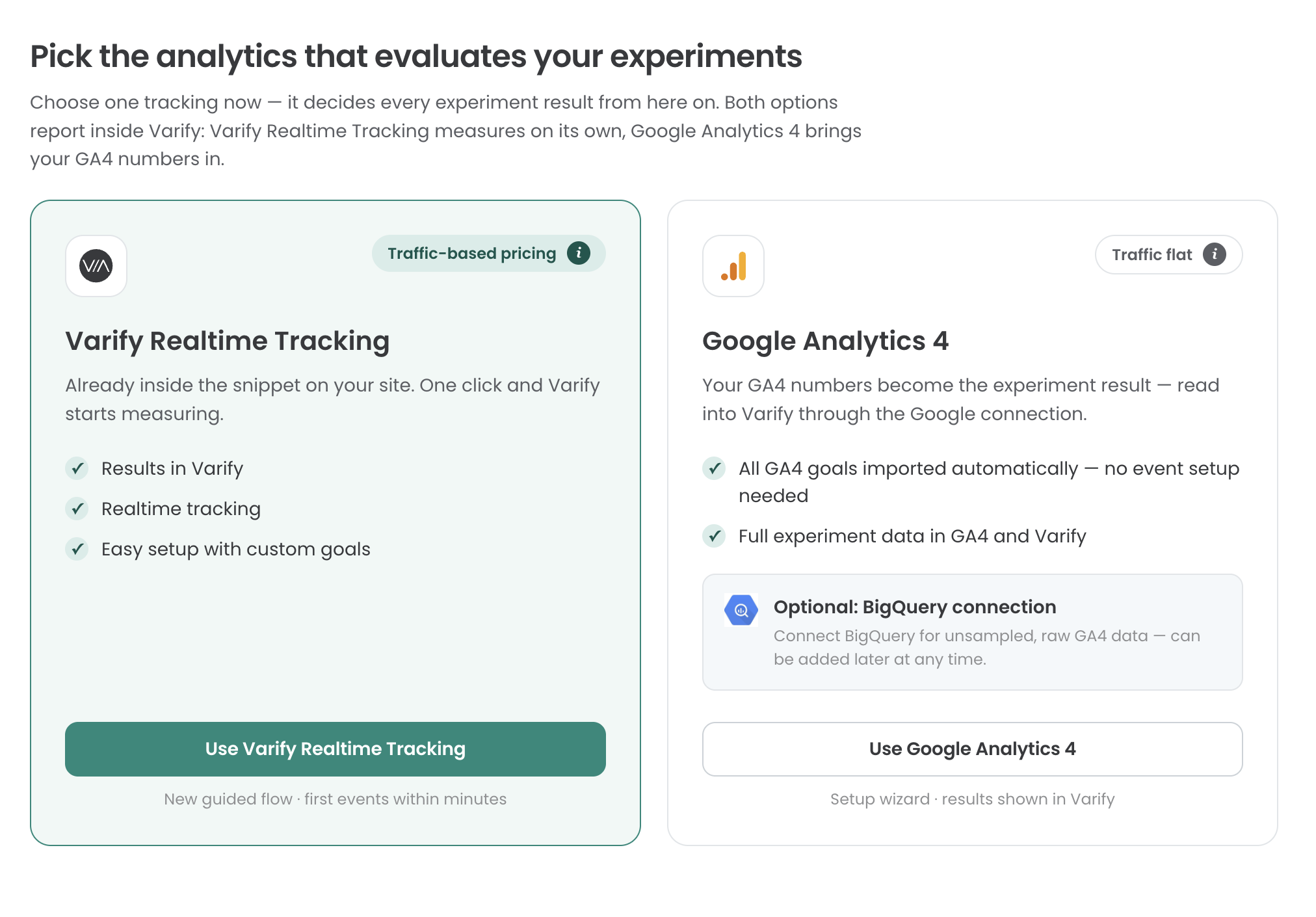
Adım 1: Tracking sistemini kur
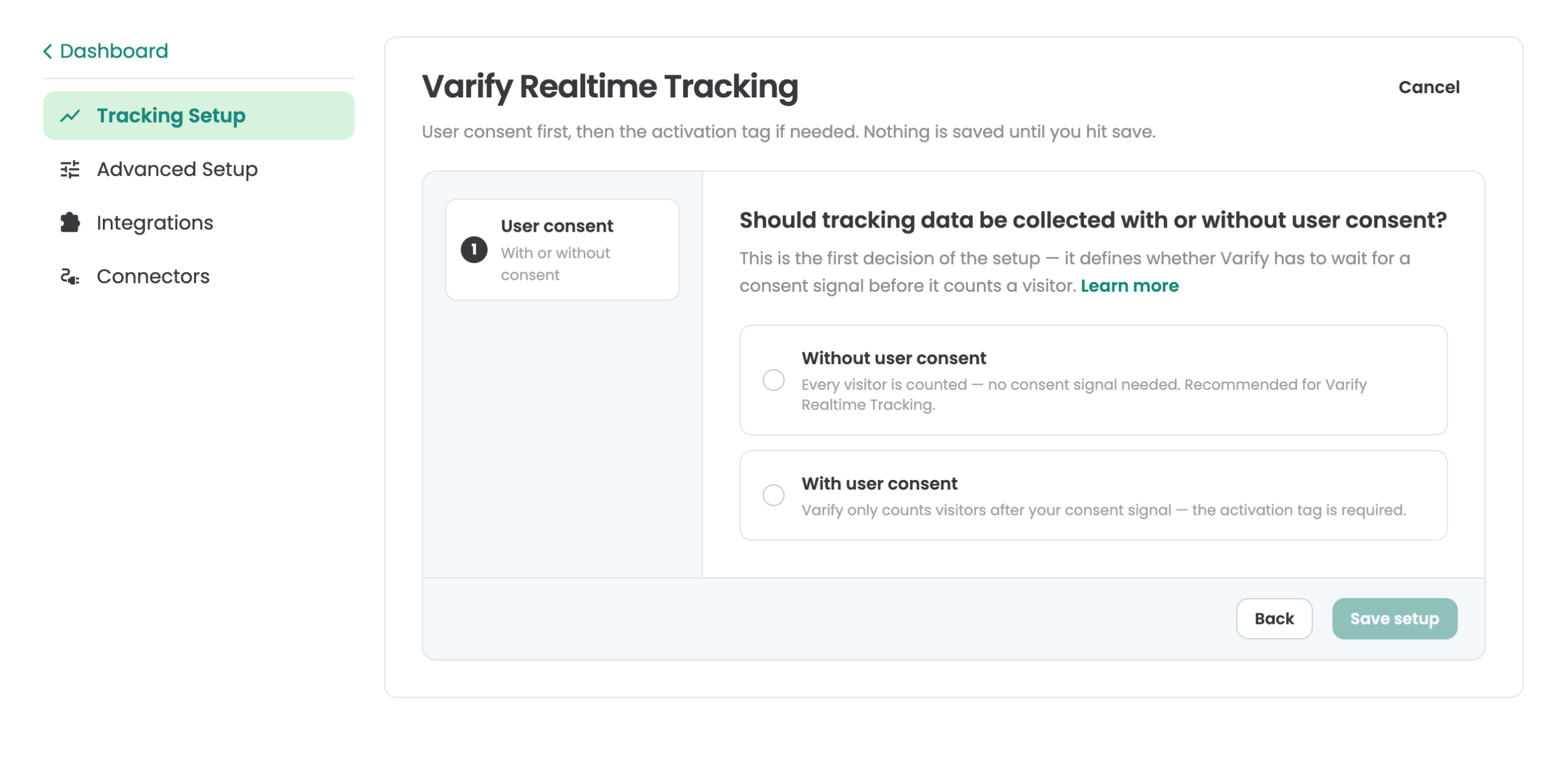
„Tracking Setup“ bölümüne git ve „Varify Realtime Tracking“ seçeneğini seç. Ardından Varify Realtime Tracking'i „User Consent“ ile mi yoksa onsuz mu entegre edeceğine karar verebilirsin. Bu kararı vermene yardımcı olacak sayfa: https://varify.io/varify-tracking-gdpr-compliance/
Adım 2: Varify Realtime Tracking'i Etkinleştirme
Kullanıcı onayı olmadan entegrasyon
Varify Realtime Tracking'i kullanıcı onayı olmadan yüklemeye karar verdiysen, temel izleme kurulumun zaten hazırdır ve Adım 3'e geçebilirsin.
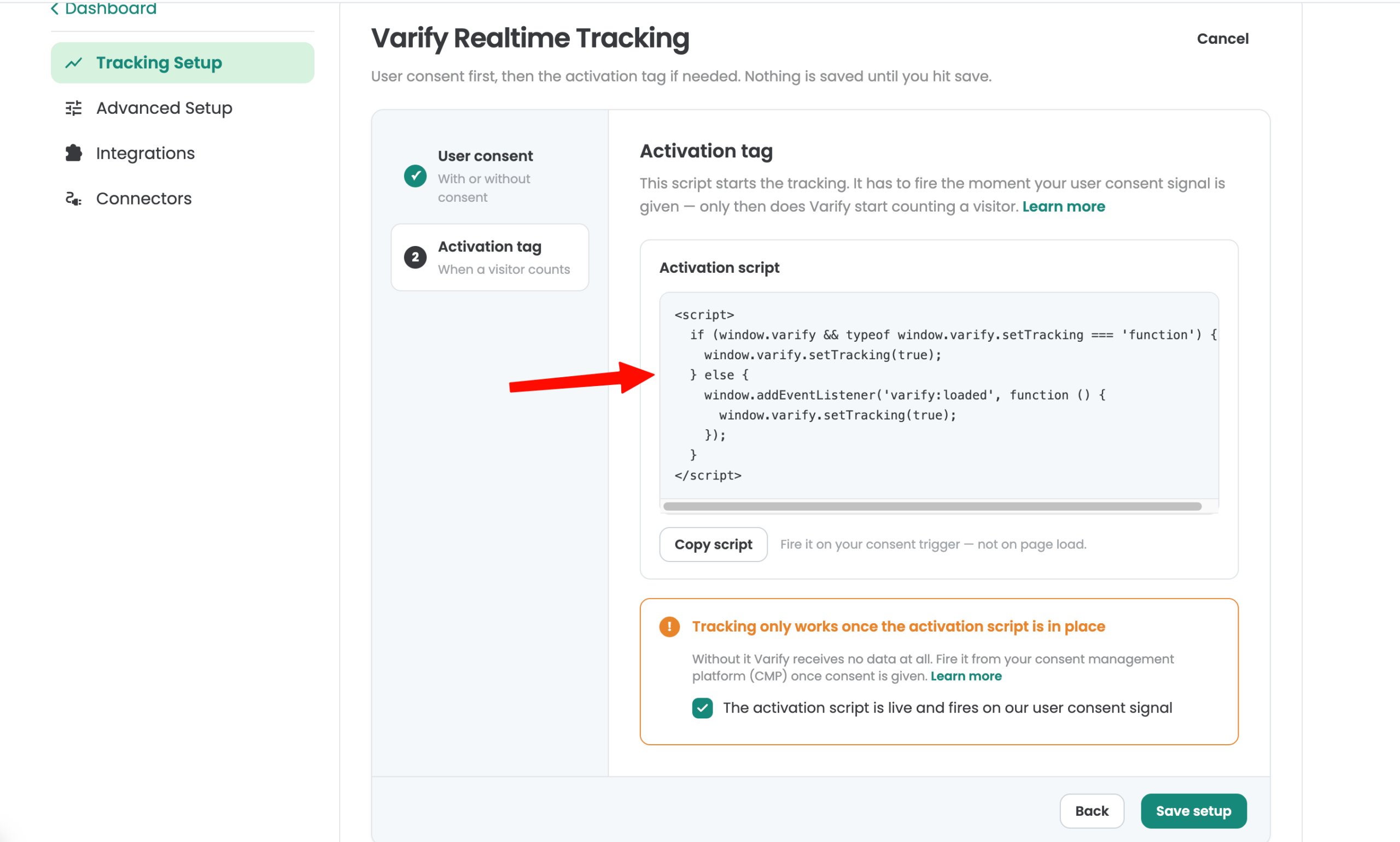
Kullanıcı onayıyla entegrasyon
Kullanıcı izniyle entegrasyon için bir aktivasyon betiği sağlanır. Bu betik yüklenir yüklenmez takip etkinleştirilir. Betiği, kendi onay yönetim platformunuzun (CMP) belirtimlerine göre entegre edin. Entegrasyon için sayfa görüntülemelerine ve geçerli bir onay sinyaline dayalı olarak Google Tag Manager (GTM) de kullanabilirsiniz.
Adım 3: Varify Hedeflerini Ayarlama
Deneylerini analiz etmek için hedefler oluştur. "Goals" bölümünü sol taraftaki kenar çubuğunda bulabilirsin.
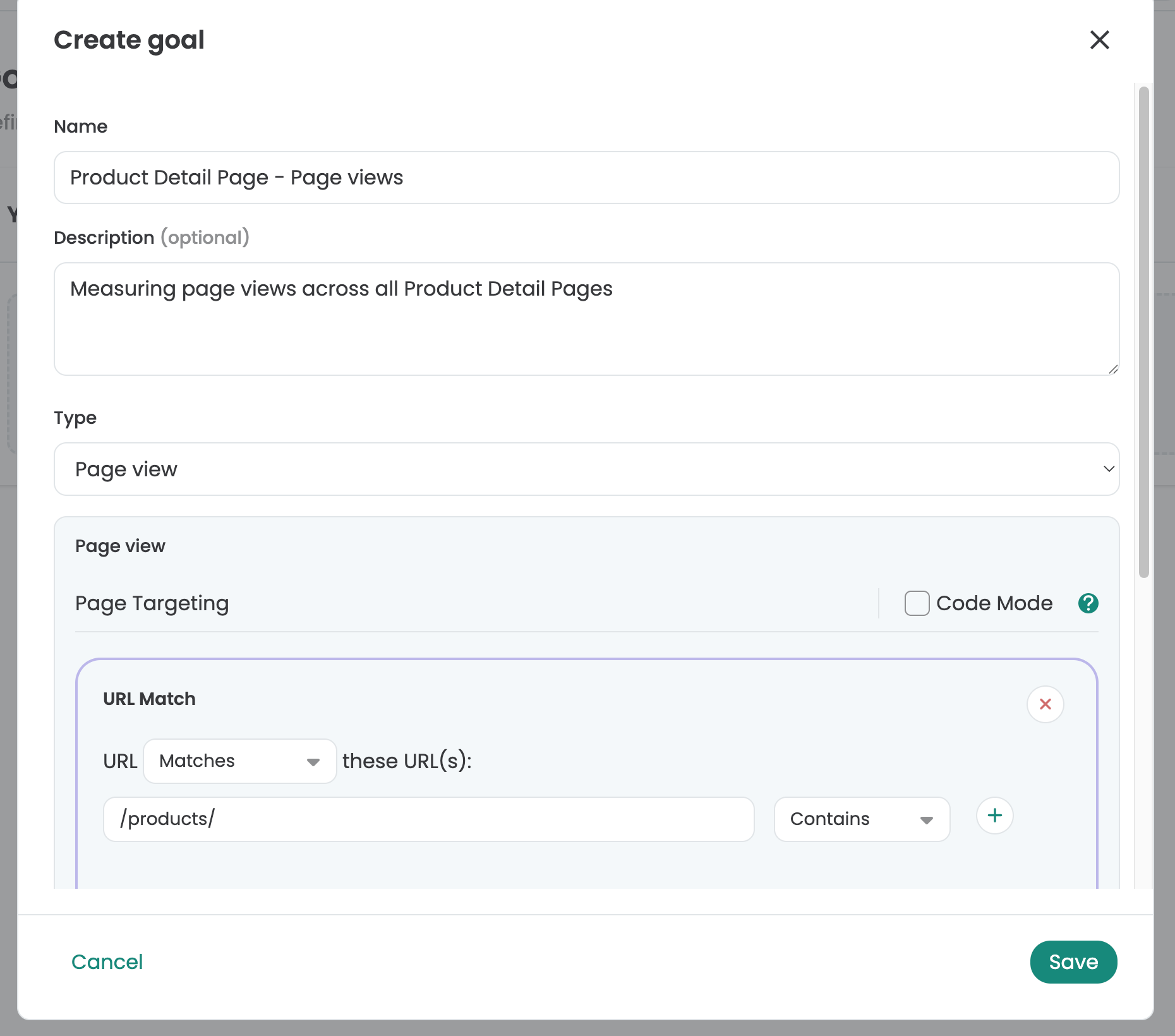
"Goals" bölümünde üç tür hedef arasından seçim yapabilirsin: Click Goal, Page View Goal ve Custom Goal.
Tıklama Hedeflerini Ayarlama
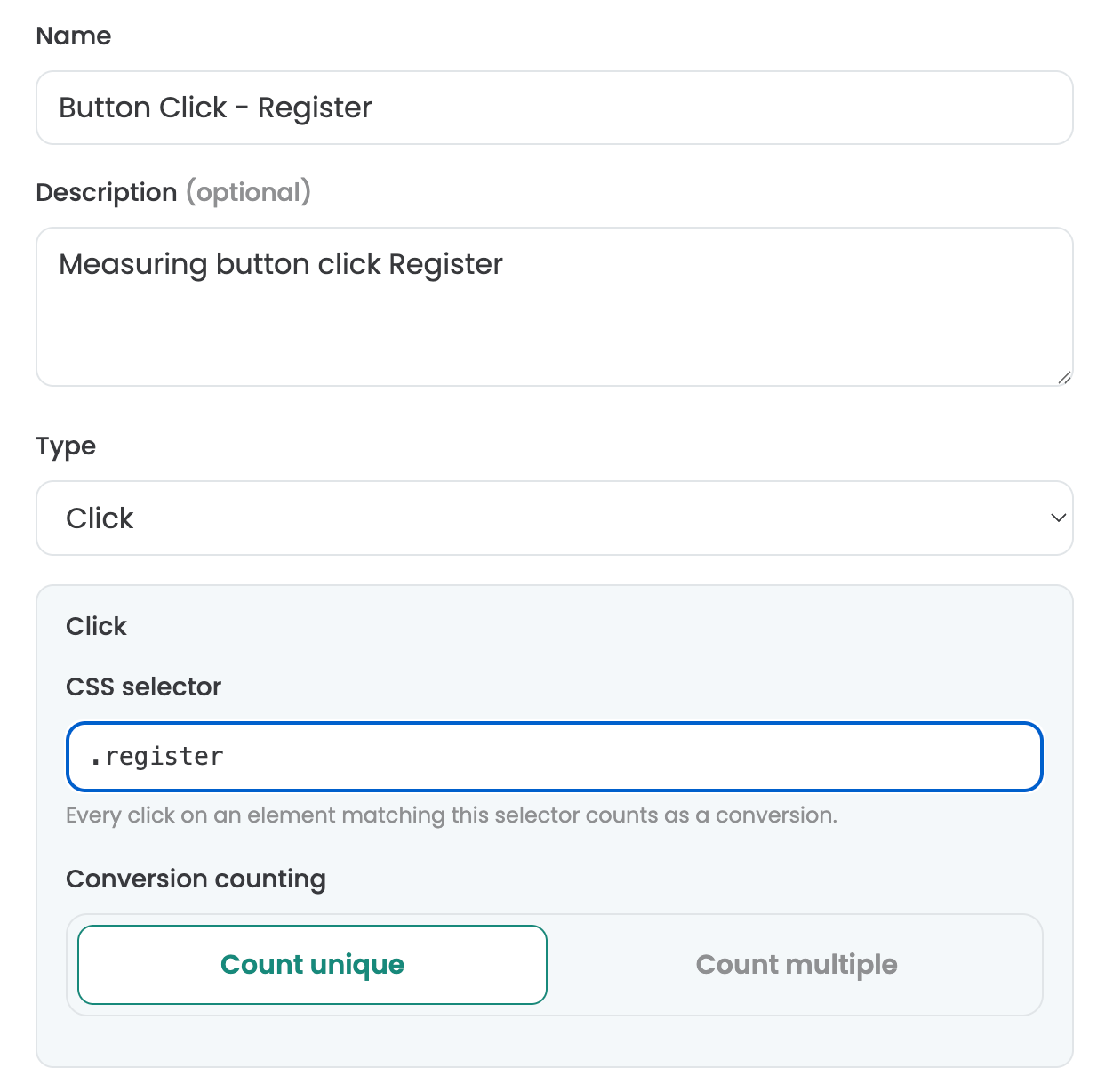
Click Goals ile, deney katılımcılarının öğelere ne sıklıkta tıkladığını ölçebilirsiniz. Bunun için öğeye özel bir seçici tanımlayın. Bir öğe için özel bir seçici belirlemek üzere, örneğin Varify'ın görsel düzenleyicisini kullanabilirsiniz. Düzenleyiciyi açın ve takip etmek istediğiniz öğeyi seçin. Ardından seçiciyi kopyalayın ve "Click Goal" altındaki "Selector" alanına girin.
Sayfa Görüntüleme Hedeflerini Ayarlama
Sayfa Görüntüleme Hedefleri ile deney katılımcılarının belirli sayfaları veya sayfa türlerini ne sıklıkla görüntülediğini ölçebilirsin. Bunu yapmak için kriterlerine uyan sayfa görüntülemelerini izlemek üzere kendi özel kurallarını tanımlayabilirsin.
Özel Hedefleri Ayarlama
Özel hedefler oluşturmak için Custom Goals kullanabilirsin. Örneğin, bir siparişin gelir değerini ölçmek istediğinde bu kullanılabilir. Custom Goals deneyinde JavaScript aracılığıyla tetiklenir.
Dönüşüm Sayımı
Bu ayar ile bir hedefin bir kez mi yoksa birden çok kez mi izleneceğini belirleyebilirsin. Varsayılan olarak, A/B testinde her hedef yalnızca bir kez izlenir, çünkü genellikle yalnızca bir kullanıcının hedefe ulaşıp ulaşmadığıyla ilgilenirsin. Ancak birden çok izleme, gelir hedefleri için faydalı olabilir: Bu durumda, bir kullanıcının sipariş değeri birden çok oturum boyunca birikebilir.
Shopify Ödeme Hedeflerini İzleme
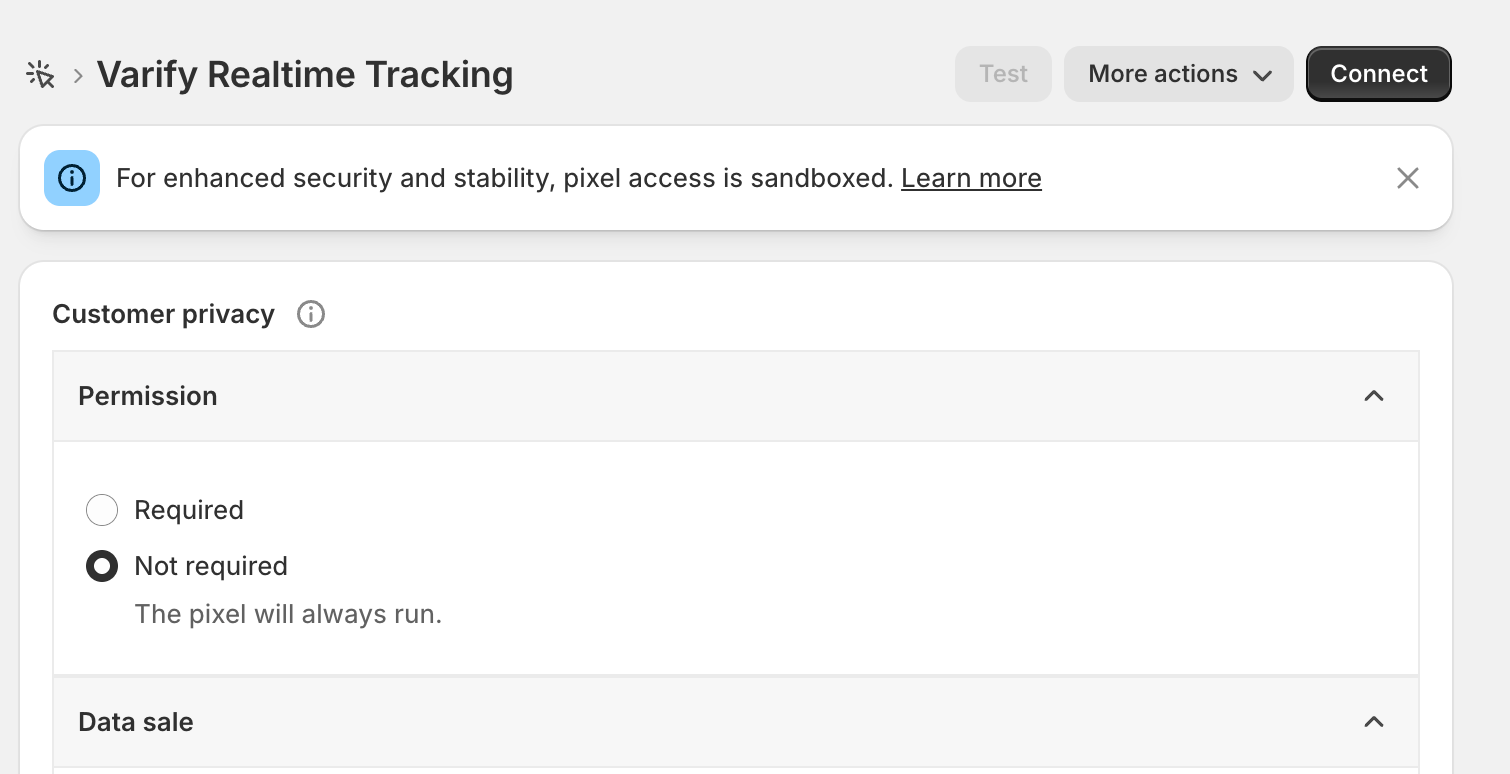
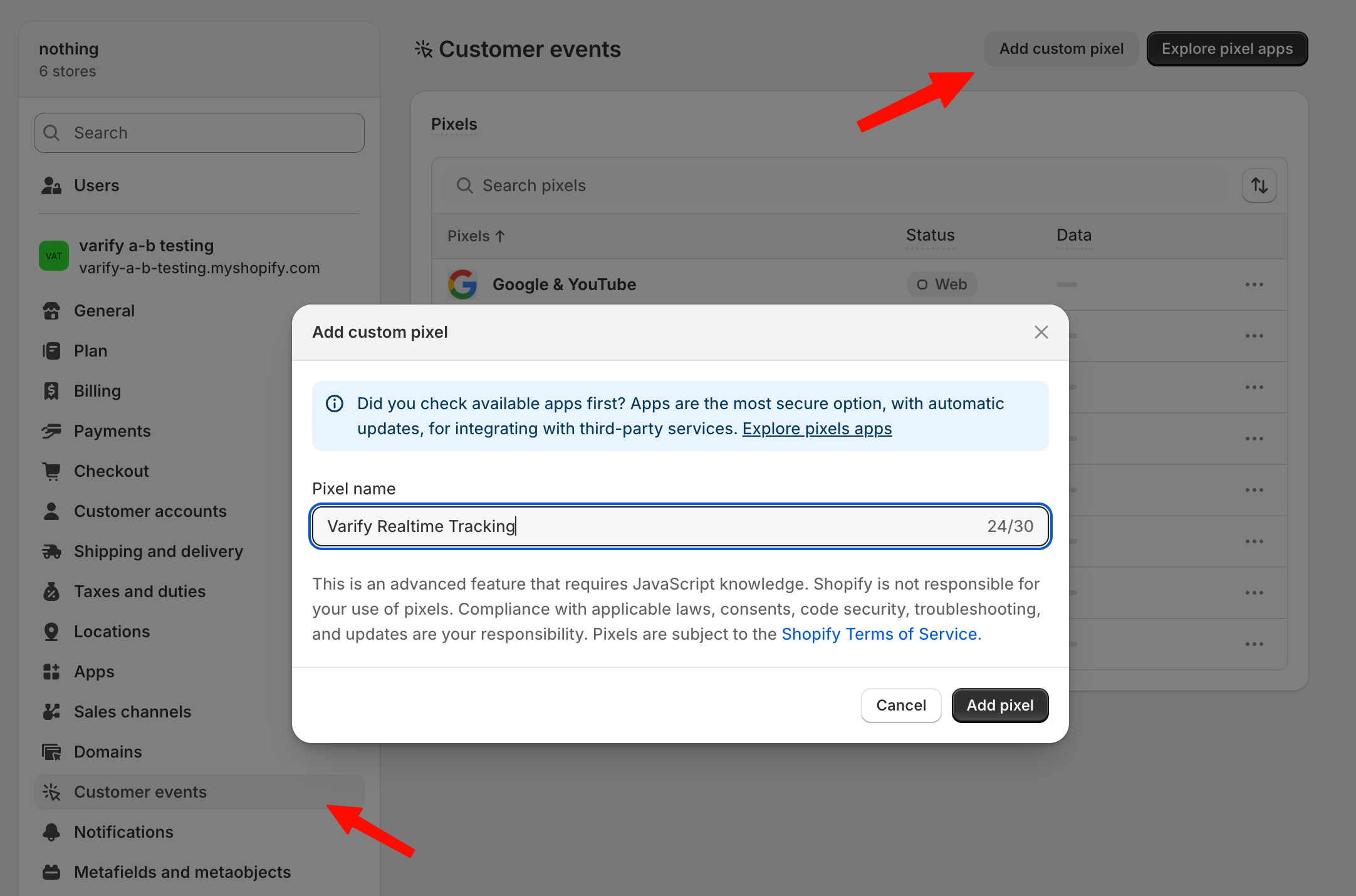
„Purchase“ veya „Start Checkout“ gibi Shopify etkinlik hedefleri, web siteniz üzerinden doğrudan takip edilemez. 2025 yılından itibaren Shopify, bunların yalnızca web sitenizdeki özel pixel aracılığıyla takip edilebilmesini zorunlu kılmıştır. Bu hedefleri takip etmek için „Settings > Customer Events“ bölümüne gidin ve „Add Custom Pixel“ düğmesine tıklayın. Pixel adını „Varify Realtime Tracking“ olarak ayarlayın ve „Add Pixel“e tıklayın.
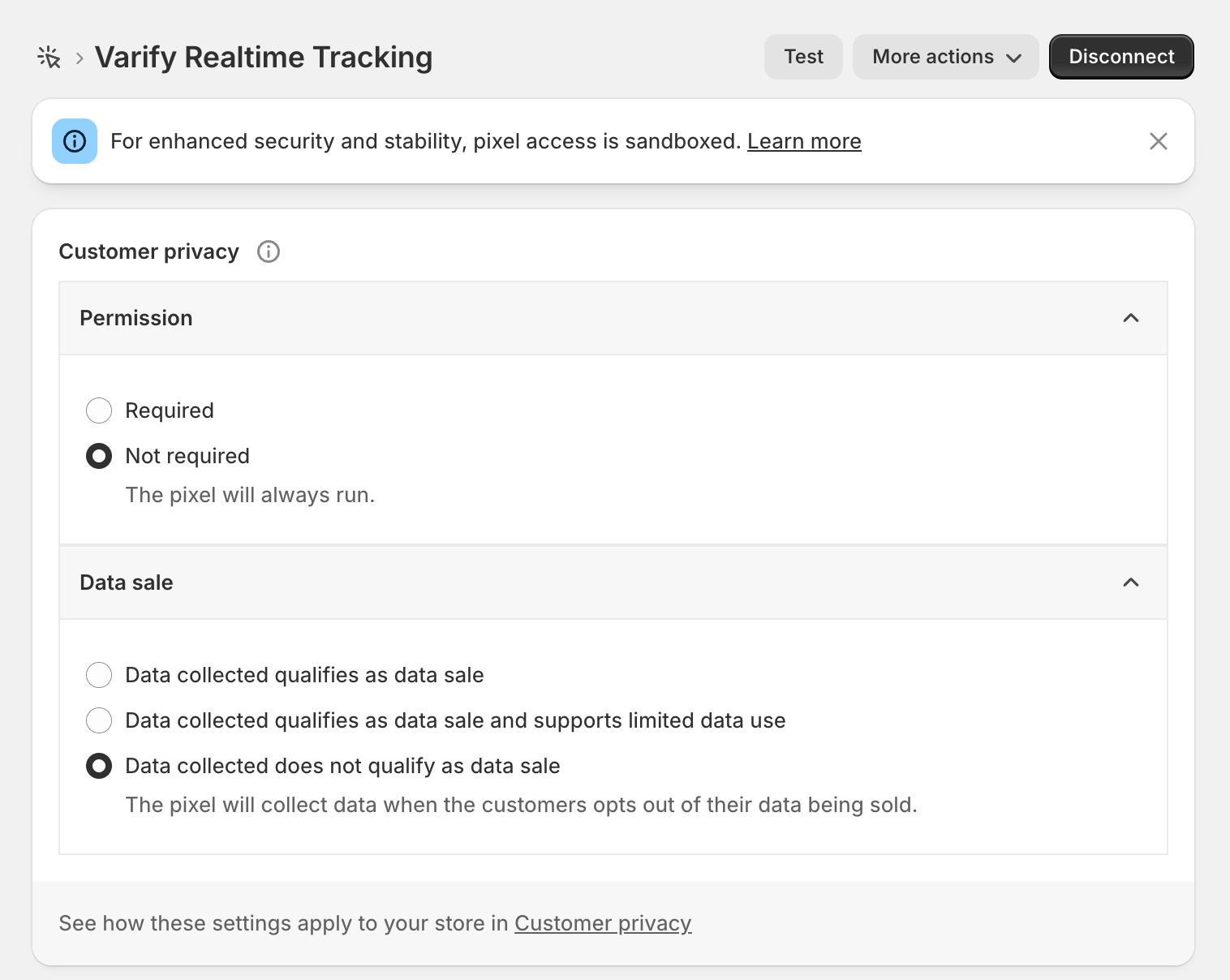
Pikseli oluşturduktan sonra, önce „Customer Privacy“ bölümünü aç ve "Data Sale" ayarını "Data collected does not qualify as a data sale." olarak ayarla. Varify veri satmaz ve deney analizleriniz için yalnızca toplu değerleri izler.
„Permission“ için, kullanıcı onayı olmadan takip yapmak istiyorsanız—daha önce takip kurulumunda belirtildiği gibi—„Not required“ seçeneğini seçmelisiniz. Öte yandan, kullanıcı onayıyla takip yapıyorsanız, ayarı "Required" olarak bırakabilirsiniz.
Ardından, bu paragrafın altında vurgulanan kodu kopyalayın ve "Code" altına yapıştırın.
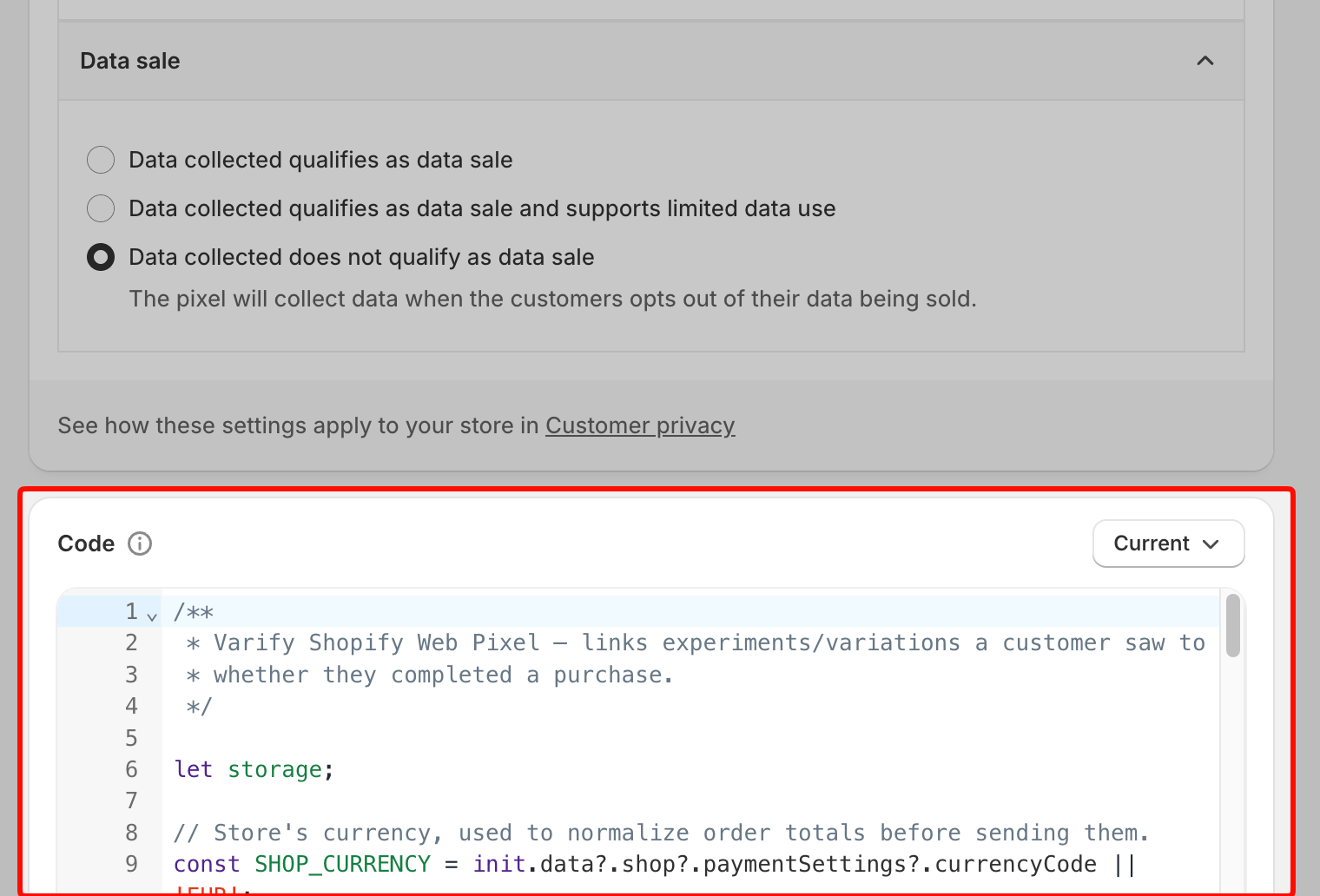
/**
 * Varify Shopify Web Pixel — links experiments/variations a customer saw to
 * whether they completed a purchase.
 */

let storage;

// Store's currency, used to normalize order totals before sending them.
const SHOP_CURRENCY = init.data?.shop?.paymentSettings?.currencyCode || 'EUR';

// Free FX API, used only when an order's currency differs from the store's.
const FX_API = 'https://api.frankfurter.dev/v1/latest';
const FX_TTL_MS = 6 * 60 * 60 * 1000;
const FX_TIMEOUT_MS = 2000;

const VARIFY_INGESTION_ENDPOINT = 'https://w.varify.io/events';

// One id per pixel session, reused for every event this pixel sends.
const pixelSessionId = crypto.randomUUID();

// Reads this pixel's saved data (experiments seen, anonymous id, etc.),
// cached in-memory after the first read.
async function getVarifyData() {
  if (storage) {
    return storage;
  }
  storage = (async () => {
    try {
      const raw = await browser.localStorage.getItem('varify-data');
      return raw ? JSON.parse(raw) : {};
    } catch (error) {
      // Don't cache a broken read — retry from scratch next time.
      storage = undefined;
      console.error('Varify: error reading local storage', error);
      return {};
    }
  })();
  return storage;
}

// Units of `currency` per 1 unit of the store's currency, or null if
// unavailable — callers should skip sending rather than guess a rate.
async function getFxRate(currency) {
  const cacheKey = `varify-fx-${SHOP_CURRENCY}-${currency}`;

  try {
    const cached = await browser.localStorage.getItem(cacheKey);
    if (cached) {
      const { rate, ts } = JSON.parse(cached);
      if (rate && ts && Date.now() - ts < FX_TTL_MS) {
        return rate;
      }
    }
  } catch (error) {
    // Fall through and fetch fresh below.
  }

  try {
    const url = `${FX_API}?from=${encodeURIComponent(SHOP_CURRENCY)}&to=${encodeURIComponent(currency)}`;

    let res;
    if (typeof AbortController === 'function') {
      const controller = new AbortController();
      const timer = setTimeout(() => controller.abort(), FX_TIMEOUT_MS);
      try {
        res = await fetch(url, { signal: controller.signal });
      } finally {
        clearTimeout(timer);
      }
    } else {
      res = await fetch(url);
    }

    if (!res.ok) {
      console.warn(`Varify: FX API returned ${res.status} for ${currency}.`);
      return null;
    }

    const json = await res.json();
    const rate = json?.rates?.[currency];

    if (typeof rate !== 'number' || !isFinite(rate) || rate <= 0) {
      console.warn(`Varify: FX API gave no usable rate for ${currency}.`, json);
      return null;
    }

    await browser.localStorage.setItem(
      cacheKey,
      JSON.stringify({ rate, ts: Date.now() }),
    );
    return rate;
  } catch (error) {
    console.warn(`Varify: FX lookup failed for ${currency}.`, error);
    return null;
  }
}

// Varify's endpoint only accepts flat text/number values, so a list of
// experiments becomes two comma-separated strings (ids and variation ids).
function flattenExperiments(entries) {
  return {
    experiment_ids: entries.map((entry) => entry.experimentId).join(','),
    variation_ids: entries
      .map((entry) =>
        entry.variationId === null ? 'original' : entry.variationId,
      )
      .join(','),
  };
}

// Edge's identifier also contains "Chrome/", so it must be checked first.
function detectBrowser(userAgent) {
  if (userAgent.includes('Firefox/')) return 'Firefox';
  if (userAgent.includes('Edg/')) return 'Edge';
  if (userAgent.includes('Chrome/')) return 'Chrome';
  if (userAgent.includes('Safari/')) return 'Safari';
  return 'Unknown';
}

function detectDevice(userAgent) {
  if (/Tablet|iPad/i.test(userAgent)) return 'tablet';
  if (/Mobi|Android/i.test(userAgent)) return 'mobile';
  return 'desktop';
}

function detectOs(userAgent) {
  if (/iPhone|iPad|iPod/i.test(userAgent)) return 'iOS';
  if (userAgent.includes('Android')) return 'Android';
  if (userAgent.includes('Win')) return 'Windows';
  if (userAgent.includes('Mac')) return 'macOS';
  if (userAgent.includes('Linux')) return 'Linux';
  return 'Unknown';
}

// Browser timezone, e.g. "Europe/Berlin" — not GPS or IP-based location.
function detectLocation() {
  try {
    return Intl.DateTimeFormat().resolvedOptions().timeZone || undefined;
  } catch {
    return undefined;
  }
}

// Non-identifying browser/page details, added to every event. The pixel
// sandbox may not expose all of these — each lookup is best-effort and
// simply omitted if unavailable.
function collectBrowserInfo() {
  const info = {};

  try {
    const userAgent =
      typeof navigator !== 'undefined' ? navigator.userAgent : undefined;
    if (typeof userAgent === 'string') {
      info.userAgent = userAgent;
      info.browser = detectBrowser(userAgent);
      info.device = detectDevice(userAgent);
      info.os = detectOs(userAgent);
    }
  } catch (error) {
    // Not available in this environment.
  }

  try {
    if (typeof window !== 'undefined' && window.location) {
      info.path = window.location.pathname;
      info.domain = window.location.hostname;
    }
  } catch (error) {
    // Not available in this environment.
  }

  const location = detectLocation();
  if (location) {
    info.location = location;
  }

  return info;
}

// Sends one event to Varify. Never throws — failures are logged and
// swallowed so the pixel/checkout is never affected. Falls back to reading
// the anonymous id from local storage if one wasn't passed in, and returns
// whichever id was actually used so the caller can persist it.
async function sendVarifyEvent(name, teamSqid, anonymousId, properties) {
  const anonymousIdWithFallback =
    anonymousId || localStorage.getItem('varify_anonymous_id');

  if (!teamSqid || !anonymousIdWithFallback) {
    console.warn(
      `Varify: skipping "${name}" event — missing teamSqid or anonymousId.`,
      'Team Sqid',
      teamSqid,
      'Anonymous ID',
      anonymousIdWithFallback,
    );
    return anonymousIdWithFallback;
  }

  try {
    await fetch(VARIFY_INGESTION_ENDPOINT, {
      method: 'POST',
      keepalive: true,
      headers: {
        'Content-Type': 'application/json',
      },
      body: JSON.stringify({
        events: [
          {
            id: crypto.randomUUID(),
            name,
            teamId: String(teamSqid),
            anonymousId: anonymousIdWithFallback,
            sessionId: pixelSessionId,
            properties: { ...collectBrowserInfo(), ...properties },
          },
        ],
      }),
    });
  } catch (error) {
    console.error(`Varify: error sending "${name}" event`, error);
  }

  return anonymousIdWithFallback;
}

// Fired by Varify's tracking script when a customer is shown an experiment.
// Remembers it locally so it can be attached to a later checkout event.
analytics.subscribe('varify', async (event) => {
  const {
    varify_experimentId,
    varify_variationId,
    varify_anonymousId,
    teamId,
    teamSqid,
    storageType = 'localStorage',
  } = event.customData || {};

  if (!varify_experimentId || !teamId || !teamSqid) {
    console.warn('Varify: event missing experimentId or teamId. Event:', event);
    return;
  }

  const validVariationId =
    varify_variationId !== undefined ? varify_variationId : null;

  const existingData = await getVarifyData();

  if (!existingData.data) {
    existingData.data = [];
  }

  const experimentEntry = {
    experimentId: varify_experimentId,
    variationId: validVariationId,
    timestamp: Date.now(),
  };

  existingData.data = existingData.data.filter(
    (entry) => entry.experimentId !== varify_experimentId,
  );

  existingData.data.push(experimentEntry);
  existingData.teamId = teamId;
  existingData.teamSqid = teamSqid;
  existingData.storageType = storageType;

  // Only present once Varify's tracking script has finished loading —
  // don't overwrite a previously-saved id with nothing.
  if (varify_anonymousId) {
    existingData.anonymousId = varify_anonymousId;
  }

  await browser.localStorage.setItem(
    'varify-data',
    JSON.stringify(existingData),
  );
});

// How long an experiment exposure counts toward a later purchase.
const WINDOW_MS = 28 * 24 * 60 * 60 * 1000;

const pruneEntries = (entries) => {
  const threshold = Date.now() - WINDOW_MS;
  return (entries || []).filter(
    (entry) =>
      entry.timestamp && entry.experimentId && entry.timestamp >= threshold,
  );
};

analytics.subscribe('checkout_started', async (event) => {
  const existingData = await getVarifyData();
  if (!existingData.data || existingData.data.length === 0) {
    return;
  }

  existingData.data = pruneEntries(existingData.data);

  await browser.localStorage.setItem(
    'varify-data',
    JSON.stringify(existingData),
  );

  if (existingData.data.length > 0) {
    const resolvedAnonymousId = await sendVarifyEvent(
      'checkout_started',
      existingData.teamSqid,
      existingData.anonymousId,
      flattenExperiments(existingData.data),
    );

    // Persist the fallback id, if used, so it doesn't need re-deriving.
    if (
      resolvedAnonymousId &&
      resolvedAnonymousId !== existingData.anonymousId
    ) {
      existingData.anonymousId = resolvedAnonymousId;
      await browser.localStorage.setItem(
        'varify-data',
        JSON.stringify(existingData),
      );
    }
  }

  // Warm the rate while the customer is still typing.
  const currency = event.data?.checkout?.currencyCode;
  if (currency && currency !== SHOP_CURRENCY) {
    getFxRate(currency);
  }
});

analytics.subscribe('checkout_completed', async (event) => {
  const orderId = event.data?.checkout?.order?.id;
  const money = event.data?.checkout?.subtotalPrice;
  let orderRevenue = money?.amount;
  const orderCurrency = money?.currencyCode;

  // 0 is a valid revenue (100% discount) and must not count as missing.
  if (!orderId || orderRevenue == null || !orderCurrency) {
    console.warn(
      'Varify: checkout_completed missing orderId, revenue or currency.',
    );
    return;
  }

  // subtotalPrice is presentment currency and the event carries no rate or
  // shop-money amount. Convert to shop currency here, or skip.
  if (orderCurrency !== SHOP_CURRENCY) {
    const rate = await getFxRate(orderCurrency);
    if (!rate) {
      console.warn(
        `Varify: skipping order ${orderId} — ${orderRevenue} ${orderCurrency}, no FX rate available.`,
      );
      return;
    }
    const converted = +(orderRevenue / rate).toFixed(2);
    console.info(
      `Varify: converted order ${orderId} — ${orderRevenue} ${orderCurrency} @ ${rate} -> ${converted} ${SHOP_CURRENCY}.`,
    );
    orderRevenue = converted;
  }

  const parsedData = await getVarifyData();
  if (!parsedData.data || parsedData.data.length === 0 || !parsedData.teamId) {
    console.warn('Varify: no valid data in local storage.');
    return;
  }

  // The order-status page refires checkout_completed on every visit.
  if (!Array.isArray(parsedData.sentOrders)) {
    parsedData.sentOrders = [];
  }
  if (parsedData.sentOrders.includes(orderId)) {
    return;
  }

  parsedData.data = pruneEntries(parsedData.data);
  if (parsedData.data.length === 0) {
    return;
  }

  const lineItems = event.data?.checkout?.lineItems;
  let cartProducts = [];

  if (lineItems && Array.isArray(lineItems)) {
    cartProducts = lineItems
      .map((item) => {
        const productId = item.variant?.product?.id?.split('/').pop();
        const variantId = item.variant?.id?.split('/').pop();

        if (productId && variantId) {
          return {
            productId,
            variantId,
          };
        }
        return null;
      })
      .filter((p) => p !== null);
  }

  const resolvedAnonymousId = await sendVarifyEvent(
    'checkout_completed',
    parsedData.teamSqid,
    parsedData.anonymousId,
    {
      ...flattenExperiments(parsedData.data),
      order_id: String(orderId),
      value: orderRevenue,
      currency: SHOP_CURRENCY,
      cart_product_ids: cartProducts.map((p) => p.productId).join(','),
      cart_variant_ids: cartProducts.map((p) => p.variantId).join(','),
    },
  );

  // Persist the fallback id, if used, so it doesn't need re-deriving.
  if (resolvedAnonymousId) {
    parsedData.anonymousId = resolvedAnonymousId;
  }

  parsedData.sentOrders = [...parsedData.sentOrders, orderId].slice(-50);
  await browser.localStorage.setItem('varify-data', JSON.stringify(parsedData));
});
Kodu ekledikten sonra, üstteki menüde "Connect" seçeneğine tıkla. Shopify takibin artık kuruldu.